01
Ask in Claude or Codex
Send the task from the AI client you already use.
Give Claude or Codex a task. Operator runs it in a separate remote workspace and returns the files and execution record for you to review.
No card. No activation code. Uses your Claude or ChatGPT subscription.
Send the task from the AI client you already use.
Choose Claude or Codex. Operator starts one isolated sandbox.
Receive artifacts and a verifiable evidence receipt.
25 free questions · no card
Start with a small project you can inspect. A useful first task is to turn a sample CSV into a grouped summary, including a README and tests for missing or invalid rows.
Create a small command-line tool that summarizes a CSV by category. Include a README, example input, expected output, and tests for an empty file and a missing column. Return the project files and execution record. Do not connect to external services.
$9.99/month or $79/year includes 30 execution hours per month and one concurrent sandbox. Trial runs are limited to 30 minutes; paid runs to 60 minutes. Your Claude or ChatGPT subscription is separate.
Start with your own taskTry 25 questions free. Choose a plan in your account.
25 questions free · no card required · cancel anytime.
30 included execution hours per month.
Choose monthly30 included execution hours per month.
Choose yearlyThe full guide
Everything below describes the hosted service as it behaves today, including what it doesn’t do. If a limit rules Operator out for your task, the sections on other ways to run an agent remotely and who it isn’t for will tell you quickly, before you spend a question.
Reviewed October 30, 2026 against the live service and its published pages. The binding text is in the Terms and Privacy notice.
Black Label Operator is a hosted place to run Claude Code or Codex away from your own computer. You add one remote connector to the AI client you already use and describe a coding task. Operator runs that task once in a separate sandbox that belongs to your account, then returns the files it produced, a transcript of the run and a receipt with a SHA-256 digest for every file.
Operator calls one of those runs a mission. It isn’t a new model, a chat assistant, an editor or a remote desktop, and it never connects to your computer. In the service’s own words, the hosted product “has no bridge to the buyer’s filesystem.”
https://operator.blacklabelbots.com/mcp is a remote MCP server with OAuth sign-in. Claude, Codex and other MCP clients use it to start missions and read results.receipt.json that ties those files to the run.“Remote” can mean several different things. The right choice depends on where your code lives and how closely you want to steer the agent.
| Approach | Where the agent runs | What you look after | Good fit |
|---|---|---|---|
| Steer a session on your own computer from another device | Your computer, with your files and tools | Keeping that computer on and online | Continuing work that’s already in your local checkout |
| Run the CLI on a server you control, over SSH or in a script | Your server or virtual machine | The operating system, updates, logins, secrets, disk and uptime | Long jobs, private repositories and custom tooling |
| Run it in a dev container | A container you define, on your machine or server | The image, network rules and whatever you mount into it | A repeatable environment for a team |
| Use a hosted workspace with Operator | A separate sandbox in your Operator account | Writing a clear brief and reviewing what comes back | One bounded task, with no server to run |
Claude Code’s documentation covers Remote Control, which continues a local session from another device, along with programmatic runs and dev containers. OpenAI documents codex exec for running Codex from scripts and CI. If your task depends on a local checkout, a private repository or a session you can keep talking to, start with those, because the hosted Operator service doesn’t do any of the three.
Operator fits the last row: a task with a clear result that can run by itself in a sandbox you don’t have to build, patch or keep online.
Setup takes one connector and one provider login. There’s no server to run, no card and no activation code.
codex mcp add. If you don’t see the setting, check your client’s own documentation.claude setup-token.In Claude: open connector settings and add a custom connector with this address. The Add to Claude button on this page opens the same settings screen.
https://operator.blacklabelbots.com/mcp
In Codex: run these two commands.
codex mcp add operator --url https://operator.blacklabelbots.com/mcp
codex mcp login operator --scopes operator:read,operator:run,operator:billing
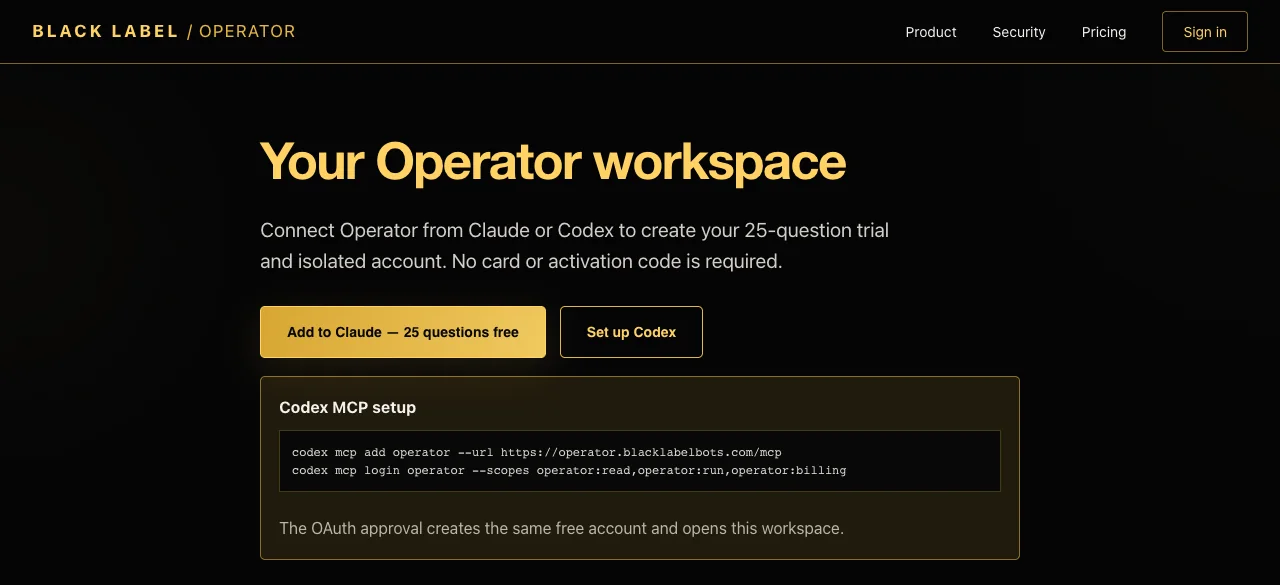
Your client sends you to Operator’s approval page. It names the client and lists what it can do: read status, start remote missions and manage your plan. Choose Connect and start free. Your first approval creates one customer account, one workspace and a trial of 25 questions. When the page says Authorization approved, continue back to your client. That authorization code expires after 10 minutes and works once.
There’s no username or password. Operator recognizes you by a signed cookie in that browser, so approve Claude and Codex in the same browser to keep them on one account. A different browser, or cleared cookies, leads to the signed-out page shown above, and a new approval there creates a separate account.
Open your Operator account. Claude and Codex each have a panel and a separate authorization.
Claude Code: run claude setup-token in Claude Code, paste the token into the CLAUDE_CODE_OAUTH_TOKEN field and choose Connect Claude. Treat that token like a password. It belongs in this field, never in a mission or a support email.
Codex: choose Connect Codex. Operator starts OpenAI’s device login inside your remote workspace and shows a link and a code. Finish the login, then choose Check connection. The attempt expires after 15 minutes. You can run the same flow from your AI client with operator_connect_codex and operator_check_codex.
Ask your client for your Operator status, which calls operator_status. Look for workspace_state set to ready and cli_authorized showing true for your provider. A working connector doesn’t by itself mean the provider is ready, so check this before you assign real work.
Ask your client to run a task through Operator. It calls operator_start with three inputs: objective (up to 12,000 characters), provider (claude or codex) and idempotency_key (a unique label for this request). The first-task prompt above is a good test because you can check its result yourself.
operator_get_run shows the status. operator_list_artifacts lists each file with its size and digest. operator_get_artifact returns a file’s metadata and an authorized download path. Read the transcript, compare the digests, run the tests, then decide whether to keep the work.
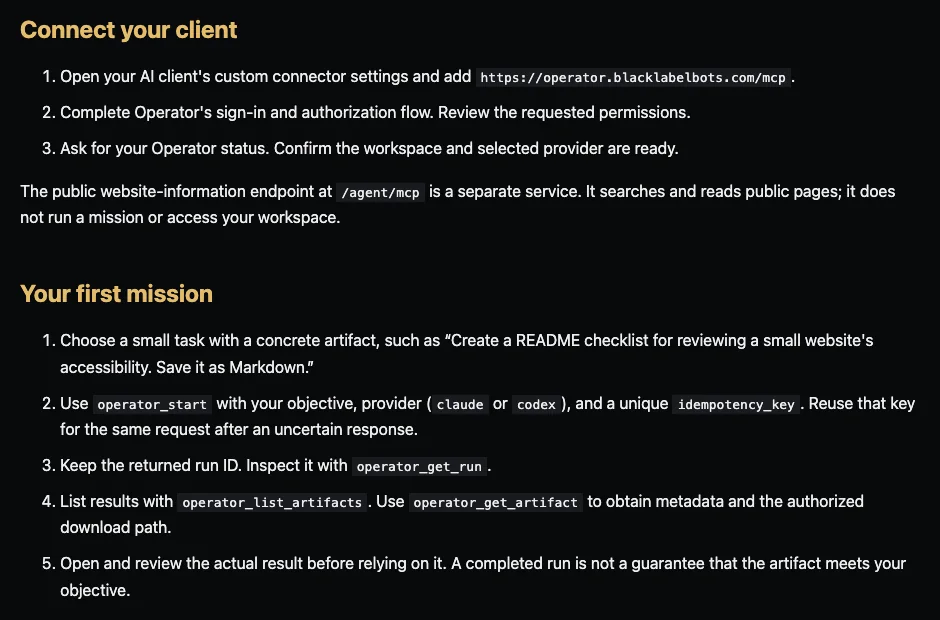
There’s no long-lived session to attach to. A mission is one non-interactive run of the CLI: claude -p for Claude Code and codex exec for Codex, with session history turned off. When it ends, it’s over. A follow-up is a new mission in a new folder, so it has to carry its own context. Don’t count on files from an earlier run still being in the sandbox.
sandbox_capacity_unavailable and the question goes back..operator/transcript.jsonl and .operator/summary.json. Symlinks are skipped, and files over 10 MB don’t come back.receipt.json and returns the receipt to your client.If the CLI fails or runs out of time, the run is marked failed and its files aren’t saved. Size each mission well inside the limit. operator_start returns when the mission ends. While it runs, operator_get_run shows its status, but there’s no live log. The transcript arrives with the artifacts.
If your client drops the response, check Recent missions in your account and keep the same idempotency key rather than starting a duplicate. A key can’t be reused for a different objective or provider. That returns idempotency_conflict.
| Field | What it tells you |
|---|---|
run_id | The mission’s ID. Keep it for support. |
provider | claude or codex. |
sandbox_id | The sandbox that ran it. |
runtime_version | The harness and CLI versions used. |
objective_digest | The SHA-256 of your objective text. |
approval_digests | Empty on the hosted service, which has no approval step. |
artifacts | Each file’s ID, path, media type, size and SHA-256. |
started_at, completed_at | When the accepted run started and finished. |
usage | The question reservation and the execution seconds. |
status | completed. A failed mission returns an error code instead of a receipt. |
Downloads are named operator-artifact-<id>, so use the path values in the receipt to put files back where they belong.
The hosted service has no approval step during a mission. This is the most important thing to understand before you start one.
| During a run | What actually happens |
|---|---|
| Permission prompts | None. Claude Code starts with --permission-mode bypassPermissions and Codex with --dangerously-bypass-approvals-and-sandbox, so the CLI edits files and runs commands without asking. The sandbox is the boundary, not a prompt. |
| Replying to the agent | Not possible. operator_respond returns run_not_waiting and delivers nothing. |
| Approving an action | Not possible. operator_decide_approval returns approval_not_found and approves nothing. |
| Stopping the run | No hosted tool does this. operator_adaptive_cancel returns adaptive_runtime_local_only. A mission ends when the CLI finishes, fails or reaches the time limit. |
| Retrying until checks pass | Not offered. Hosted missions run once. The adaptive loop and customer-supplied verification commands require the installed local Operator MCP and aren’t part of the hosted service. |
Your control sits before and after the run:
operator_start is marked destructive and open-world in its MCP annotations, so a client that honors those hints can ask you before calling it. That behavior belongs to your client.| Tools | What they do | Scope |
|---|---|---|
operator_status, operator_get_run, operator_list_artifacts, operator_get_artifact | Read your own account, mission and artifact details. | operator:read |
operator_connect_codex, operator_check_codex | Begin or finish Codex device login in your workspace. | operator:run |
operator_start | Reserves usage and runs the selected provider. The mission can create or change files and reach external services. | operator:run |
operator_billing | Reads your plan and the checkout and billing paths. It doesn’t charge anything. | operator:billing |
operator_respond, operator_decide_approval, operator_adaptive_start, operator_adaptive_cancel | Boundary tools. They report the hosted limit and take no action. | operator:run |
operator_adaptive_status | Boundary tool. It reports the same limit. | operator:read |
Your computer’s files stay put. What you type into a mission leaves, and so do the logins you choose to connect.
| What | Where it lives | What happens to it |
|---|---|---|
| Files and repositories on your computer | Your machine | The hosted service can’t see them. Only what you or your AI client put in the objective leaves. |
| Objective text | Operator and your provider | Written into your sandbox and read by the CLI, which sends it to Anthropic or OpenAI under your subscription. Run records keep a SHA-256 digest of it. |
| Claude setup token | Created on your machine, then stored by Operator | Encrypted at rest with AES-GCM and injected only into your sandbox for Claude missions. |
| Codex login | Created in your remote workspace | OpenAI’s device login runs there. The auth cache is encrypted at rest, injected only for Codex missions and removed from the sandbox when the run ends. |
| Files a mission creates | Cloudflare R2 | Stored under your account with a digest. Reading them needs your authorization. |
| Run records and logs | Cloudflare | Status, timestamps, sandbox details and the logs needed to diagnose a run. |
| Payment details | Stripe | You pay on Stripe’s checkout page. Operator keeps Stripe customer, subscription and receipt references. |
| Visits to public pages | PostHog and Google Analytics | Measured on public pages under the choices in the privacy banner and the Privacy notice. Private account pages aren’t sent through this measurement. |
The Privacy notice says Operator doesn’t sell personal information or use customer code, objectives, credentials or artifacts for targeted advertising. Anthropic and OpenAI act under your own subscriptions, so their terms and data policies apply to what the CLI sends them.
Retention. Operator doesn’t publish a fixed deletion schedule. Authorization stays until you remove it, it expires or it’s revoked. Account, billing, mission, artifact and security records stay while they’re needed to provide the service, keep receipts, resolve disputes, prevent fraud or meet legal duties. Temporary sandbox state follows the run lifecycle.
Your controls. Remove either provider from your account at any time and revoke the connector in your AI client. To request access, correction, export, artifact deletion or account deletion, email info@blacklabelbots.com with “Operator privacy request”. Required transaction, security and accounting records may remain. Never email a setup token or auth cache.
operator:read from the account that owns it.| Limit | Today |
|---|---|
| Free trial | 25 accepted questions, shared across Claude and Codex |
| Run length | 30 minutes on the trial, 60 minutes on a paid plan |
| Included execution | 30 hours per month on a paid plan |
| Concurrency | One concurrent sandbox |
| Objective | 12,000 characters |
| Returned files | 10 MB per file, with a cap on how many files one mission can return |
| File names | Letters, numbers, dots, dashes, underscores and slashes. Any other character in a returned path, including a space or @, fails the mission with invalid_harness_artifact. |
| Providers | Claude Code and Codex |
| What goes in | Objective text only. The connector has no Git, upload or file tool. |
| What comes out | Files and a receipt. The connector has no pull request or deploy tool. |
| Account page | Plan, usage, provider panels and the 10 most recent missions. It doesn’t list files. |
The sandbox image includes git, so a brief can name a public repository to clone. Private repositories aren’t a supported path, because credentials don’t belong in mission text.
| Detail | Free trial | Monthly | Yearly |
|---|---|---|---|
| Price | $0, no card | $9.99 a month | $79 a year |
| What’s metered | 25 accepted questions | 30 included execution hours per month | 30 included execution hours per month |
| Longest run | 30 minutes | 60 minutes | 60 minutes |
| Concurrent sandboxes | One | One | One |
| Claude or ChatGPT subscription | Yours, paid separately | Yours, paid separately | Yours, paid separately |
Twelve monthly payments come to $119.88, so the yearly plan costs $40.88 less at list price.
On the trial, a question is one mission accepted through operator_start. Checking status, listing artifacts and reading billing don’t use one, and neither does a sandbox startup failure before acceptance. After acceptance it counts, even if the mission then fails. When the trial is used up, operator_start returns payment_required.
On a paid plan the meter is execution time rather than questions, recorded when a mission completes. Once the included time is used, a new mission returns execution_limit_reached. Your Claude or ChatGPT subscription is separate, and its usage limits apply to every mission.
Choose a plan from your account. The monthly or yearly button opens Stripe Checkout, and payment starts only when you choose. The plan activates after Operator receives and verifies Stripe’s webhook, and your workspace stays the same.
To cancel renewal, choose Manage billing in your account to open the Stripe Billing Portal. Cancellation takes effect according to the subscription period shown there. Refund requests go to info@blacklabelbots.com with your Stripe receipt reference and are reviewed case by case. Refunds and cancellation has the details.
The agent can’t ask you anything, so every decision it might need has to be in the objective. Start from this template.
Goal: one result you can check.
Input: a public repository URL and commit, or data pasted below.
Allowed changes: the files or folders this mission may touch.
Output: leave these files in the working folder. Use plain file names.
Checks: run this test command. Report each result, including anything you couldn’t run.
If blocked: don’t wait for an answer. Record the blocker in NOTES.md and finish with what works.
Cleanup: remove node_modules and build caches before you finish.
Do not: use credentials or publish anything.
@ fails the mission, so a leftover node_modules folder can sink an otherwise good run.# macOS shasum -a 256 operator-artifact-<id> # Linux sha256sum operator-artifact-<id>
Compare the result with the sha256 value from operator_list_artifacts. A match shows you have the bytes Operator stored. It doesn’t show they work. Read the changes, run the tests and replay the behavior in your own environment. An execution receipt and a deployment are separate facts.
More detail: Write a bounded coding mission, Read an artifact receipt and Review a completed coding mission.
| Error | What it means | What to do |
|---|---|---|
authentication_required | The connector has no valid token. | Reconnect through your client’s normal Operator authorization flow. |
insufficient_scope | This connection lacks the permission that tool needs. | Authorize the required scope. |
cli_authorization_required | The provider you chose isn’t connected. | Connect it in your account. For Codex, finish the device login and check its status. |
invalid_cli_authorization | The saved provider login is no longer valid. | Remove it and connect the provider again. |
codex_subscription_required | The Codex login contained an API key. | Log in with your ChatGPT subscription instead. |
payment_required | The 25-question trial is used up. | Choose a plan in your account. |
execution_limit_reached | The included execution time is used up. | Check your status and billing before starting another mission. |
inactive_license | The subscription isn’t active. | Check your plan under Manage billing. |
sandbox_capacity_unavailable | A sandbox couldn’t start. The question went back. | Try again later. |
sandbox_execution_failed | The CLI failed or ran out of time. No files were saved. | Narrow the brief and check your provider’s usage limits. |
invalid_harness_artifact | A returned file path has an unsupported character. | Ask for plain file names and remove dependency folders. |
idempotency_conflict | That key was already used for another objective or provider. | Use a new key for a new request. |
run_not_found, artifact_not_found | The ID doesn’t belong to the connected account. | Use an ID from the account you’re connected to. |
run_not_waiting, approval_not_found | Hosted missions don’t take input or approvals. | Expected. Put the decision in the next mission’s brief. |
adaptive_runtime_local_only | That tool needs the installed local Operator MCP. | Use operator_start for a hosted mission. |
For anything else, email info@blacklabelbots.com with “Operator” as the product name, your run ID or Stripe receipt reference, and the error code. Never include a Claude setup token, Codex auth cache, repository secrets or private keys. See Support.
Add the Operator connector to Claude at https://operator.blacklabelbots.com/mcp, approve it, run claude setup-token and paste the token into your Operator account. Then ask Claude to start a mission. Operator runs Claude Code in a separate sandbox and returns the files and a receipt.
Yes. Add the connector with codex mcp add, log in with codex mcp login, then connect Codex through OpenAI’s device login, which runs inside your remote workspace. Operator refuses a Codex login that contains an OpenAI API key.
No. Operator doesn’t request or store Anthropic or OpenAI API keys. Missions use your own Claude or ChatGPT subscription, and that provider’s terms and usage limits still apply.
No. The hosted service has no bridge to your filesystem. It only receives what you or your AI client put in the objective, so check what your client includes before it starts a mission.
Not through a supported path. The connector has no Git or file upload tool, and credentials don’t belong in mission text. A brief can name a public repository to clone, or include small inputs directly in the 12,000-character objective.
No. Hosted missions run once with the CLI’s permission prompts turned off. operator_respond returns run_not_waiting and operator_decide_approval returns approval_not_found. Put every decision in the objective.
The hosted service has no cancel tool. A mission ends when the CLI finishes, fails or reaches its time limit: 30 minutes on the trial and 60 minutes on a paid plan.
The run is marked failed with an error code and its files aren’t saved. On the trial, the question still counts once the mission has been accepted. A sandbox startup failure before acceptance doesn’t use a question.
One mission accepted through operator_start. The 25 questions are shared across Claude and Codex. Reading status, listing artifacts and checking billing don’t use one.
25 questions are free with no card. After that it’s $9.99 a month or $79 a year, each including 30 execution hours per month and one concurrent sandbox. Your Claude or ChatGPT subscription is separate.
operator_list_artifacts lists each file with its size and SHA-256 digest. operator_get_artifact returns its metadata and a download path, /v1/artifacts/<id>, which needs an OAuth bearer token with the operator:read scope. The account page lists missions, not files.
It shows which exact bytes came from which recorded run. It doesn’t show that the code is correct, secure or complete. Read the changes and run the tests before you rely on the result.
Each provider’s authorization is encrypted at rest and stored separately. It’s injected only into your own sandbox for the provider you selected, and you can remove it from your account at any time. Provider-side sessions may also need to be managed with that provider.
The connector guide covers Claude and other MCP clients. A client has to add a remote MCP server and complete Operator’s OAuth sign-in. Operator’s published setup steps are specific to Claude and Codex.
The public hosted service isn’t offered for regulated protected health information without separate compliance review and any required written agreement. Don’t put passwords, private keys, recovery codes, card data or unnecessary personal records in an objective either.
Cancel renewal in the Stripe Billing Portal from your Operator account. Cancellation takes effect according to the subscription period shown there. Refund requests go to info@blacklabelbots.com with your Stripe receipt reference and are reviewed case by case.
Michael Barber, through Black Label Bots and the BlackLabel Tech network. Support is at info@blacklabelbots.com.
25 questions free. No card. No activation code.
Keep reading: Connector guide · Product guides · Plan within the trial limits · Support